 monthlet
monthlet is a note app where you write and grow notes through AI chat. Until now, the AI in chat could do work around notes (write, edit, search, read) plus a few integrations we built in, such as web search and reading the contents of a URL you specify. Version 0.12.2, released on August 13, 2026, lets you register MCP servers yourself. That means you decide which tools the AI in monthlet has access to.
What MCP is
MCP (Model Context Protocol) is a shared convention for connecting AI to external tools. It is used by tools such as Claude Desktop and Claude Code, and many “MCP servers” that follow the convention already exist: servers that read local files, query databases, or call internal company systems. The ones published officially by the maintainers are collected in a single repository, and you can also write your own.
monthlet now speaks that convention, so you can use what already exists without building anything new.
Connecting one — example: a server that reads and writes a local folder
Here is a walkthrough using a server that actually exists: the filesystem server published officially by the MCP maintainers (@modelcontextprotocol/server-filesystem). It allows reading and writing only inside a folder you specify, and it can be launched with npx, so no installation step is needed in advance (its GitHub page). npx ships with Node.js, so if you do not have it, install it from nodejs.org.
Open Settings (⚙) → the Connectors tab → Add custom MCP, and fill in the fields as follows.
- ID —
fs. This is prefixed to operation names (for examplefs__read_text_file). Lowercase ASCII letters and digits plus-and_only, up to 32 characters. - Display name — something like
Local files. It is the name shown on the card, so anything you recognize works. - Connection — Command (stdio).
- Command —
/opt/homebrew/bin/npx(the path thatwhich npxprints, as-is). - Arguments — one per line:
-y, then@modelcontextprotocol/server-filesystem, then the path of the folder to allow (in this example/tmp/mcp-demo). - Environment variables — not needed for this server. For servers that require a key, you would write entries such as
API_KEY=…here.
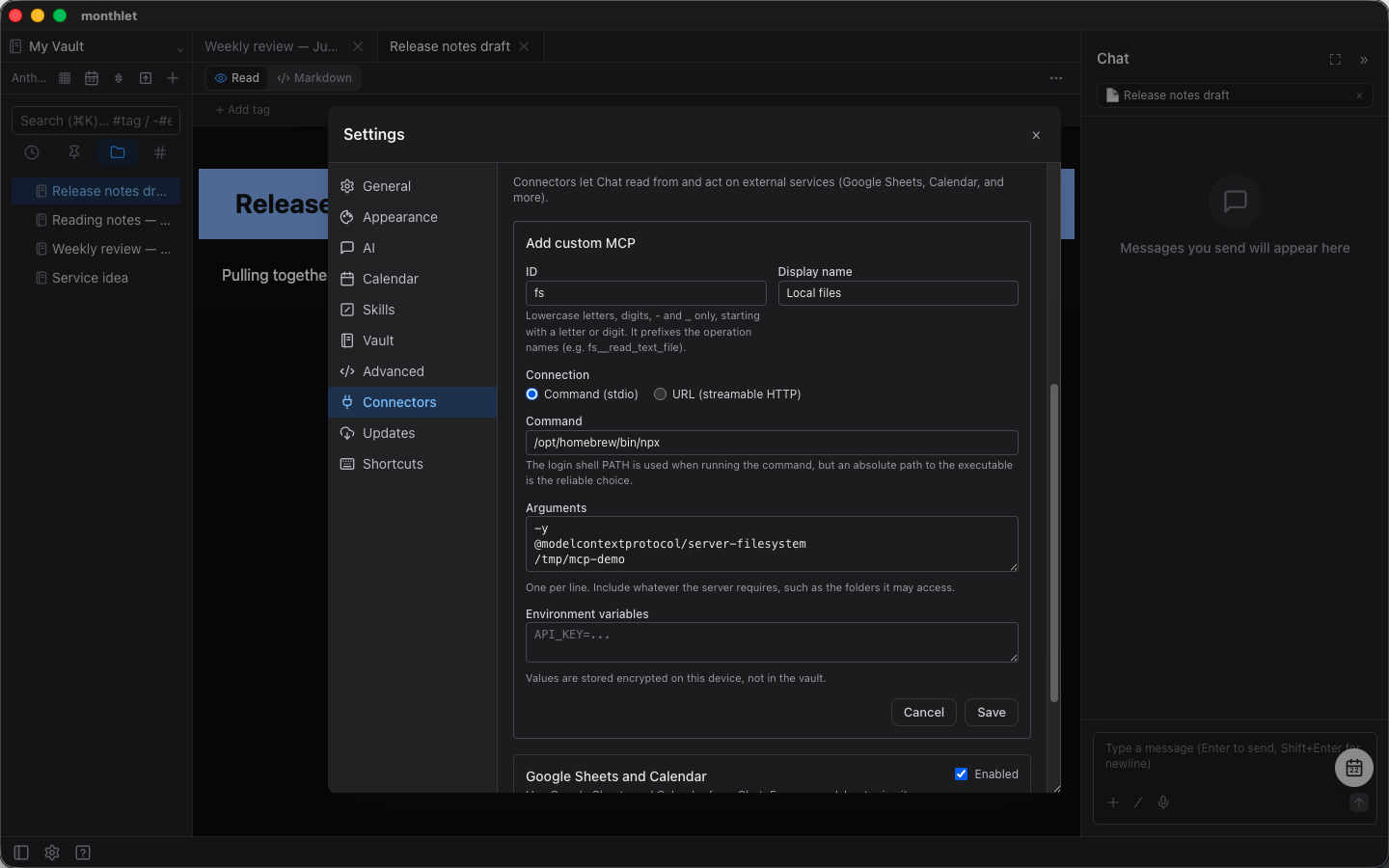
To connect to a server published at a URL, choose URL (streamable HTTP) instead, and add the URL plus any HTTP headers it requires.
When you save, monthlet tries the connection right away. On success, the list of operations that server provides appears on the card, so you can see at a glance what has become possible. Operations that require confirmation before running — writes, for example — are marked Confirm.
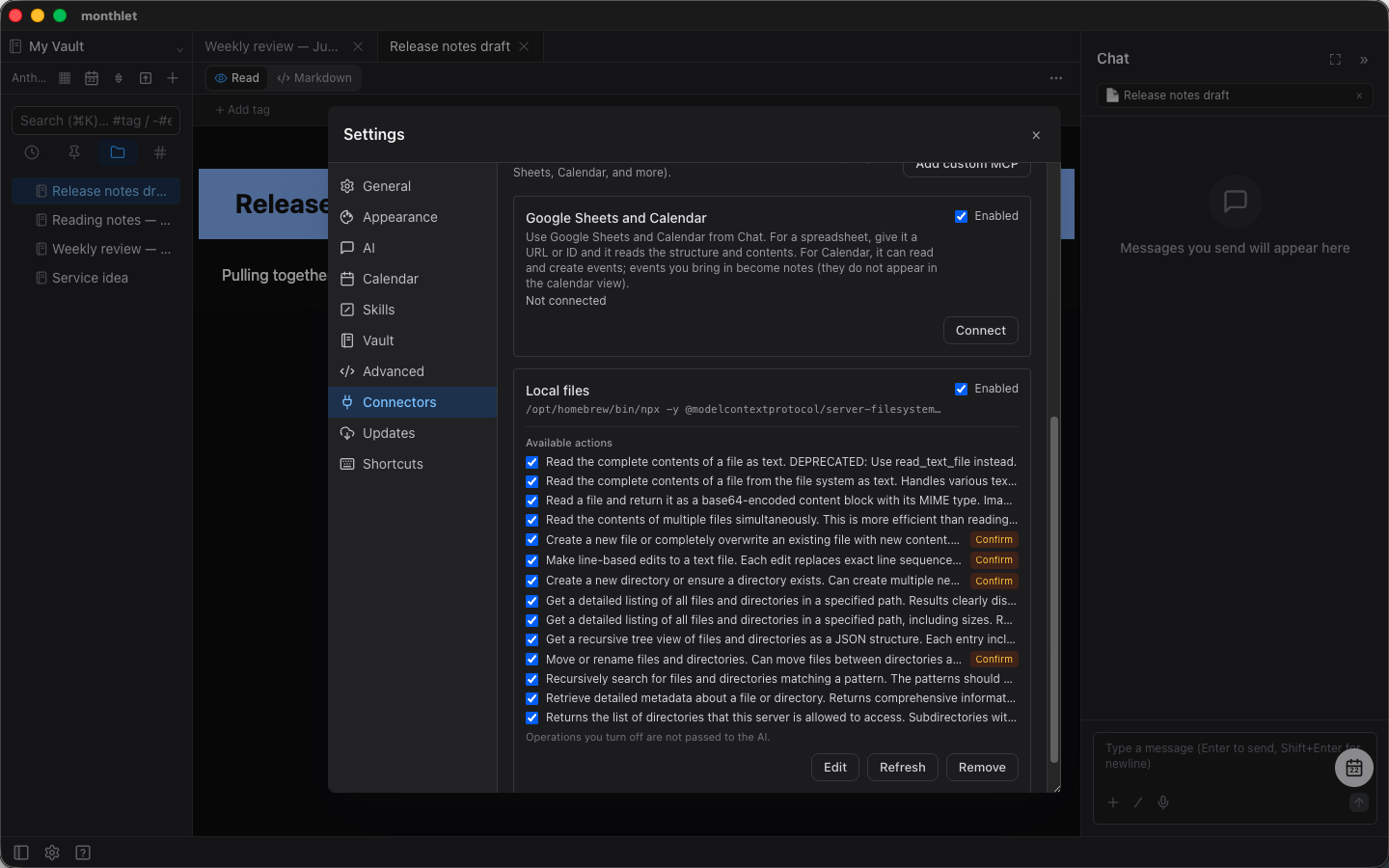
Environment variable values and HTTP header values are stored encrypted on this device, not in the vault. The vault is just a folder, so you can put it in a location like iCloud Drive and sync it across devices, as described in an earlier post — but keys and tokens should not travel along with it.
Then just ask the AI
Once a server is registered, you write in chat as usual. “What’s in this folder?” or “Summarize what’s in there into a note” — you can ask without thinking about the names of the tools.
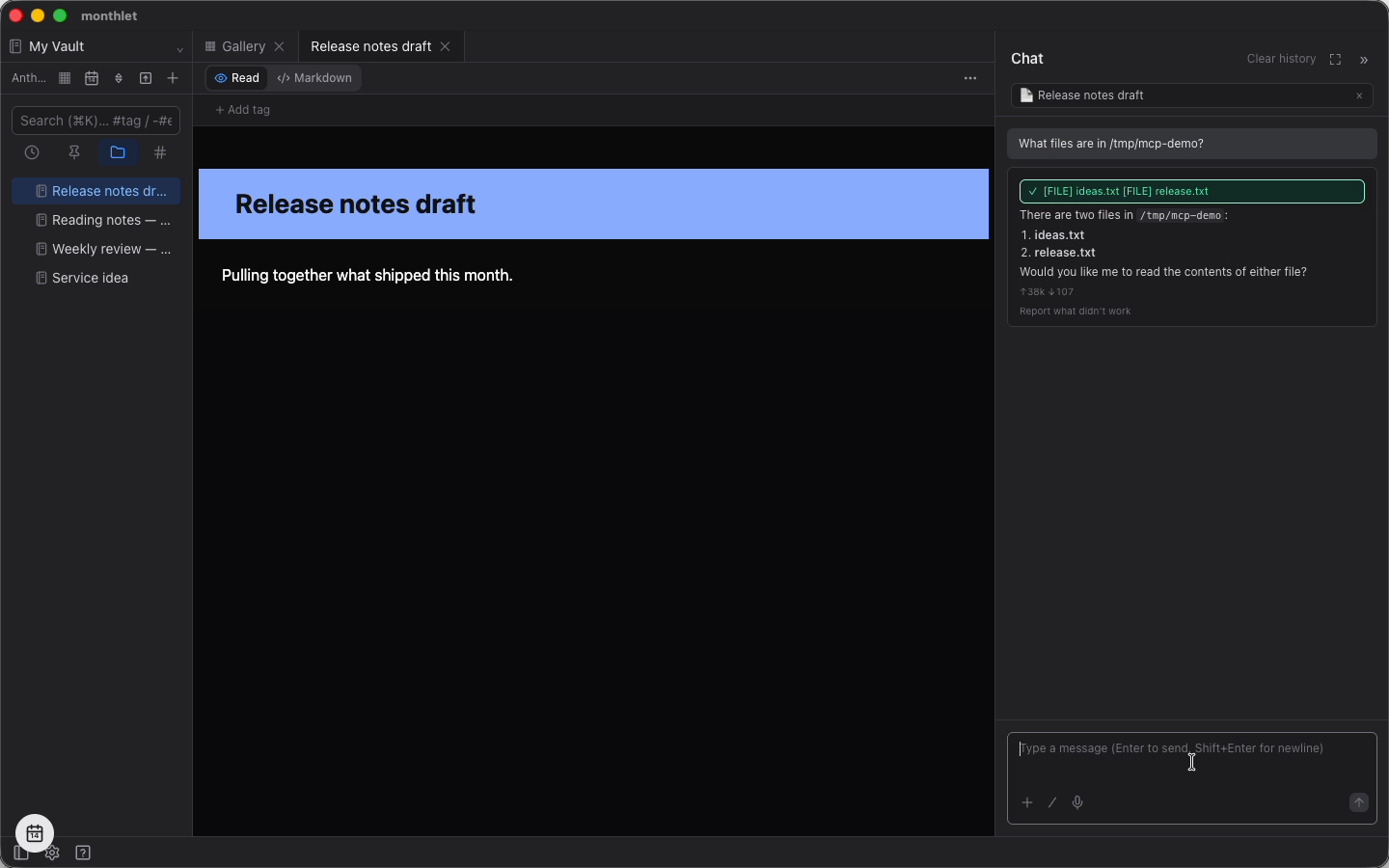
We recorded the actual flow as a one-minute video.
Confirmation before writes
An MCP operation can declare “this is read-only.” monthlet runs an operation without confirmation only when it is declared read-only. Everything else — including operations with no declaration at all — always shows a confirmation dialog before running.
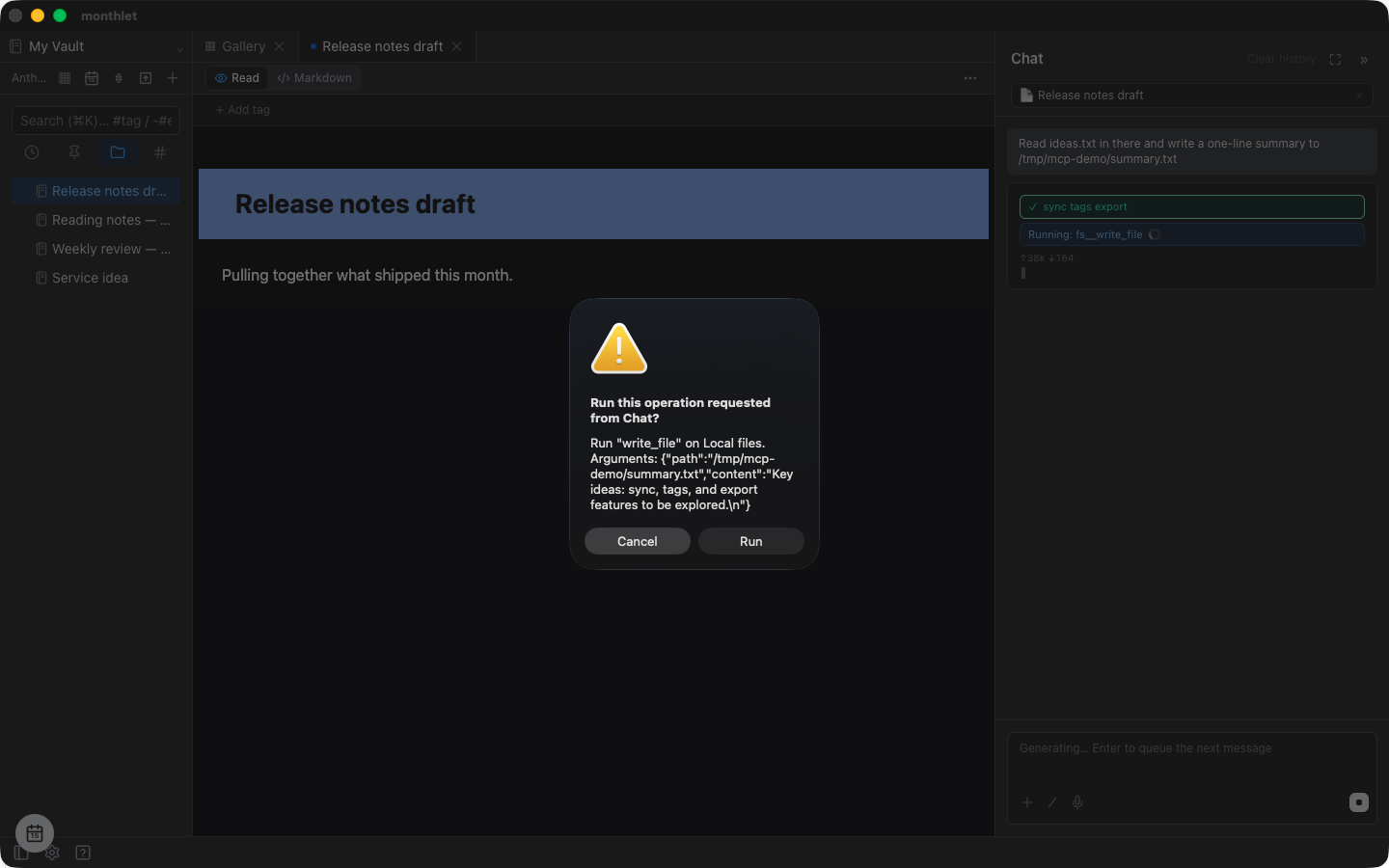
There is one exception: operations that communicate with the outside are confirmed even when they are reads. Fetching something from the web is that kind of operation.
This matches how monthlet itself is built. When the AI accesses a URL it assembled on its own, monthlet always asks first. Attaching note contents to a URL and sending them outward is an action that needs human approval for safety. It would defeat the purpose if the same action passed straight through when it came via MCP.
Note that the “read-only” declaration is self-reported by the MCP server, so a server can lie about it. We still designed it this way because the act of registering a server is itself a decision to trust it. Not registering servers you do not know is the first line of defense.
One more thing. Under Settings (⚙) → AI there is an option to auto-approve the Chat’s vault operations (off by default). Up to 0.12.3, turning it on also skipped confirmation for MCP operations. That setting exists to make operations inside the vault easier, so skipping confirmation for outside servers was not the intent. As of 0.12.4 (released today), MCP operations are excluded from that setting.
Started only when used, stopped when not
Servers launched by command (stdio servers, like the filesystem one above) do not start when you open a vault. They start the first time one of their operations is actually called. If they go unused for 10 minutes they stop automatically, and start again the next time they are called.
Holding several unused processes while you are only writing notes is inefficient.
MCP servers specified by public URL are not launched by monthlet, but they are treated the same way. monthlet connects only when an operation is called, and closes the connection after 10 minutes of no use. The 10 minutes is monthlet’s own rule rather than something the server decides, so it behaves the same for every server.
The list of operations is recorded at registration time, so the AI knows what is available even while a server is stopped. If operations are added or removed on the server side, press Refresh on the card to fetch the list again.
Turn off operations you don’t use
Each entry under Available actions on the card has a checkbox and can be turned off individually. Operations that are off are not passed to the AI.
Handing over more tools does not automatically make the AI smarter. The more choices there are, the more the AI hesitates, and the longer the explanation sent each time becomes, which slows down responses. If a server exposes fourteen operations and you only ever use three, keeping just those three enabled makes it faster and more accurate.
Public MCP servers and authentication
Some MCP servers published on the internet require authentication.
When you register such a server by URL, a browser opens on save and asks for permission. Once you grant it, you return to monthlet and authentication happens automatically from then on. There is no need to do a developer registration in advance or to fetch a key from somewhere and paste it in, because this follows the authentication flow defined by MCP itself. When the authentication expires, press Refresh on the card to authenticate again.
Common stumbling blocks
- Specify the command with an absolute path. For commands used via PATH, such as
npx, monthlet loads the login shell’s PATH before running — but in some environments the PATH is not picked up and the command fails. Writing/opt/homebrew/bin/npxavoids the problem. - Write one argument per line. Specify what the server requires, such as the folder to allow access to. Do not paste a terminal line as-is; break it at each space-separated unit. (Quotes and forms like
$HOMEare not expanded; they are passed through as literal strings.) - Environment variable and HTTP header values appear blank when you reopen the edit screen later; saved values are not shown back on screen. Saving while they are blank clears them, so re-enter them when editing.
google,monthlet,vault, andplugincannot be used as an ID, because they collide with names the app uses itself.- For servers that grant access to a folder, start with a folder you would not mind losing. How far a server can reach depends on how it was built.
- monthlet uses only operations (tools). Other things a server may provide (resources and prompts) are not handled for now.
- Among servers that require authentication, those without a mechanism to accept connecting apps automatically are not supported yet (entering a pre-issued ID by hand is not supported).
What’s next
What became possible this time is the direction of monthlet using outside tools. The reverse direction is also planned: exposing monthlet itself as an MCP server, so external agents such as Claude Code can read and write monthlet notes safely. A monthlet note is a single, straightforward .html file, so it can be rewritten from the outside by brute force — but doing so breaks the internal structure and the note looks wrong from inside the app. Providing a way to operate on notes from the outside without breaking them is the next job.
References
- The official MCP site (specification and concepts): https://modelcontextprotocol.io
- The list of servers published officially by the MCP maintainers: https://github.com/modelcontextprotocol/servers
- The filesystem server used in this post (setup and argument reference): https://github.com/modelcontextprotocol/servers/tree/main/src/filesystem
- Node.js, required to use
npx: https://nodejs.org
Try it
monthlet is currently distributed for macOS (Apple Silicon). (Added October 2026) The Windows version is now on the Microsoft Store. Enter your own AI API key and all features are available.
- Download: monthlet.ai/download
- Discord: discord.gg/aP4Hc7cJGU
- X: @monthlet
- YouTube: @monthletofficial